This guide walks you through how you get paid for ads — when your ad revenue becomes available, how to set up your payout method, and what to expect along the way.
Your Payable Balance Explained
The revenue you see on the Dashboard is an up-to-date estimate. Once ad revenue is verified and settled, it's added to your Payable Balance on the Payments page — this is the money that's actually ready to be paid out.

Ads come from various sources, including direct campaigns within the Ads Marketplace and ads from third-party DSPs. Settlement timelines vary by source — typically within 1 to 6 months.
Setting Up Your Payout Method
To receive payouts, you'll need to add a payout method first. Currently, PayPal is the only option available.
Go to the Payments page, click Add Payout Method, enter a valid PayPal account email, and save. Once saved, you can come back anytime to view or update your PayPal information.

When You'll Get Paid
Payouts are processed starting on the 15th of each month. You'll need a minimum balance of $20 in your Payable Balance for a payout to go through.
Once processing starts, you'll see a transaction marked Payout (Pending). The money usually arrives in your PayPal account within 7 to 14 business days. When it's complete, the transaction will update to Payout.
If you leave the Ads Marketplace, you'll still receive ad earnings that become payable afterward. However, if your Podbean account is no longer active, payouts will NOT be processed. If you have questions or need a manual payout, please contact us.Understanding Your Transactions
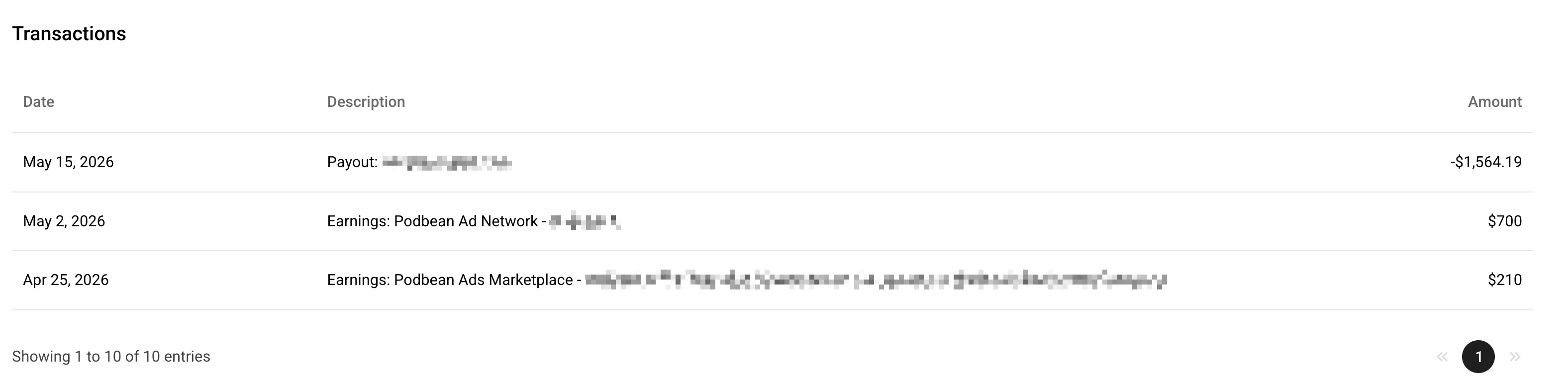
In the Transactions section on the Payments page, you'll typically see two types of transaction records:
- Earnings — Ad revenue has been verified, settled, and added to your Payable Balance.
- Payout — Funds have been sent from your Payable Balance to your PayPal account.